Review

Kindle Colorsoft 16 GB Review for Readers Who Want Colour on E Ink

On 22 September 2026 the Kindle Colorsoft 16 GB was number 7 on Amazon's US best-seller list for eBook readers, nine places above its own Signature Edition. It is the cheaper of Amazon's two 7-inch colour Kindles. Amazon added it in July 2025 below the Signature Edition, which keeps an auto-adjusting front light, wireless charging and 32 GB. In practice this model is the 12th-generation Paperwhite's body with a colour E Ink screen inside, and its direct rivals are Kobo's Libra Colour and Clara Colour.

Buy it if a real share of your reading has pictures in it: comics and manga, cookbooks, travel guides, children's books, textbooks with charts. If you mostly read novels, the Paperwhite does that job at least as well and carries a longer battery rating, which is why our Kindle Paperwhite review still calls it the default.

This is a research-based assessment. Nobody at ReaderPilot has read on this unit. It rests on Amazon's product page and announcement, two independent reviews of the 16 GB model and reporting on the software changes since launch, each cited where it is used.
By Published Research-based assessment

Affiliate disclosure: the price links on this page may earn us a commission at no extra cost to you. Retailers cannot pay for placement or influence the score. How we stay independent

Quick verdict

Amazon Kindle Colorsoft 16 GB (1st generation, 2025 release), Black, no ads
7.1/10
Editorial ratingGoodWeighted average of 5 rated sections.

Buy the Kindle Colorsoft 16 GB if comics, cookbooks, travel guides or illustrated books make up a real part of your reading, because the colour layer is what you are paying for. Buy a Paperwhite if you mostly read novels. Amazon itself says the colour filter changes how the page looks next to a Paperwhite, and the battery rating drops by a third.

Strengths

  • Colour covers, comics, maps and four highlight colours on a front-lit E Ink screen that stays readable in direct sun
  • Text as sharp as the Paperwhite's
  • 215 g and 7.8 mm, in the Paperwhite 12th generation's body, so its cases fit

Weaknesses

  • Amazon rates the battery at two thirds of the Paperwhite's, under the same test conditions
  • Amazon warns that the colour filter makes the page look different from a Paperwhite's
  • No ambient light sensor and no wireless charging, both kept for the Signature Edition

Key specifications

Display
7-inch Colorsoft with built-in light, 300 ppi black and white, 150 ppi colour, 16-level greyscale (Amazon)
Panel and pixels
E Ink Kaleido 3, 1264 by 1680 (Good e-Reader, not stated by Amazon)
Front light
Adjustable white to amber, 25 LEDs (12 white, 13 amber per Good e-Reader). No ambient light sensor
Dimensions
127.6 x 176.7 x 7.8 mm
Weight
215 g (7.6 oz)
Storage
16 GB, no card slot, free cloud storage for Amazon content
Battery
Up to 8 weeks at half an hour a day, wireless off, light at 13 (Amazon). 2310 mAh (Good e-Reader)
Charging
USB-C, under 2.5 hours with a 9 W adapter. No wireless charging. No adapter in the box
Wi-Fi and Bluetooth
2.4 GHz and 5 GHz Wi-Fi. Bluetooth for Audible and VoiceView (5.1 per Good e-Reader)
Processor and memory
MediaTek dual-core 2 GHz, 1 GB RAM (Good e-Reader)
Water resistance
IPX8, 2 m of fresh water for 60 minutes
Formats
AZW3, AZW, TXT, PDF, unprotected MOBI, PRC natively. EPUB, DOCX, DOC, HTML, RTF and images through conversion. Audible AAX
In the box
Kindle Colorsoft, USB-C charging cable, Quick Start Guide
Ads
Sold without lock-screen ads
Colour
Black
Warranty
1-year limited warranty (US)
Generation
Kindle Colorsoft (1st Generation), 2025 release

How we reviewed it

Basis
Research-based: assessed from the manufacturer’s published specifications, documentation and the independent sources listed at the end. We have not tested this unit ourselves; any measurement quoted belongs to the cited source.
Method

We read Amazon's US product page for ASIN B0CGVSKR1G in full on 22 September 2026, including the technical details, the comparison chart and the FAQ, and Amazon's announcement of the 16 GB model. Independent observations come from Good e-Reader's full review of the 16 GB model and Tom's Guide's review of the same model, with Engadget's reporting used for the 2024 yellow band history and The eBook Reader for the 2026 dark mode rollout. Demand was read from Amazon's US Best Sellers list for eBook readers on 22 September 2026 at 06:20 UTC. Each section is scored against what a reader gets from the Paperwhite and from Kobo's colour readers, because those are the choices a buyer of this model is making. Where Amazon's own page contradicts itself, the conflict is stated and the newer evidence is preferred.

Evidence

Amazon publishes the dimensions, weight, resolution, storage, battery test conditions, charge time, formats, water rating and in-box contents for this model. Good e-Reader adds the panel type, pixel count, LED count, processor, RAM and battery capacity, which Amazon does not publish, and those figures are attributed to it. No independent measurement of contrast, colour gamut or battery runtime was found for this model, so none is quoted.

Limitations

Nobody on this site has read on a Kindle Colorsoft. How the colour filter looks next to a Paperwhite, how the warm light mixes and how the black finish handles fingerprints are reported from other reviewers. No laboratory measurement of the screen or of battery runtime was available. Good e-Reader reported in 2025 that sideloaded PDFs displayed without colour, and this review could not establish whether a later software update fixed that. The dark mode rollout is staged by Amazon, so a given device may not show it yet. Search demand could not be measured, because no search-volume source is available to this workflow. Prices are left to the offers table.

Colour at 150 ppi, text at 300

7.0/10Good
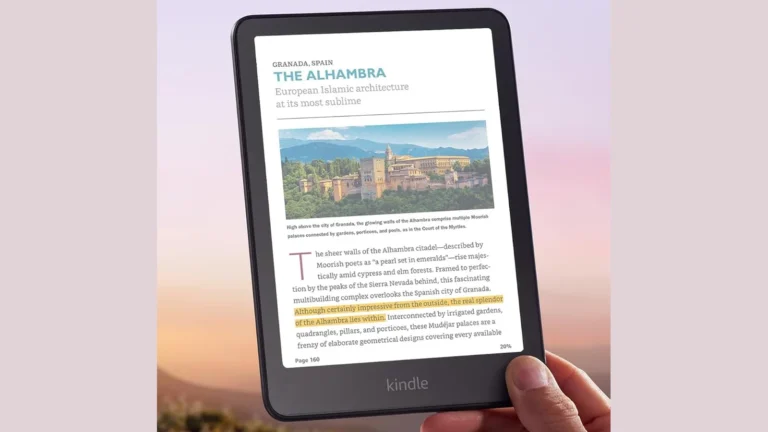
Kindle Colorsoft held in one hand, showing a travel guide page with a colour photo of the Alhambra and a passage highlighted in yellow
Authentic crop of an Amazon listing image for the Kindle Colorsoft 16 GB. The screen content is Amazon's own demonstration page. Product illustration based on manufacturer imagery (Amazon listing image)

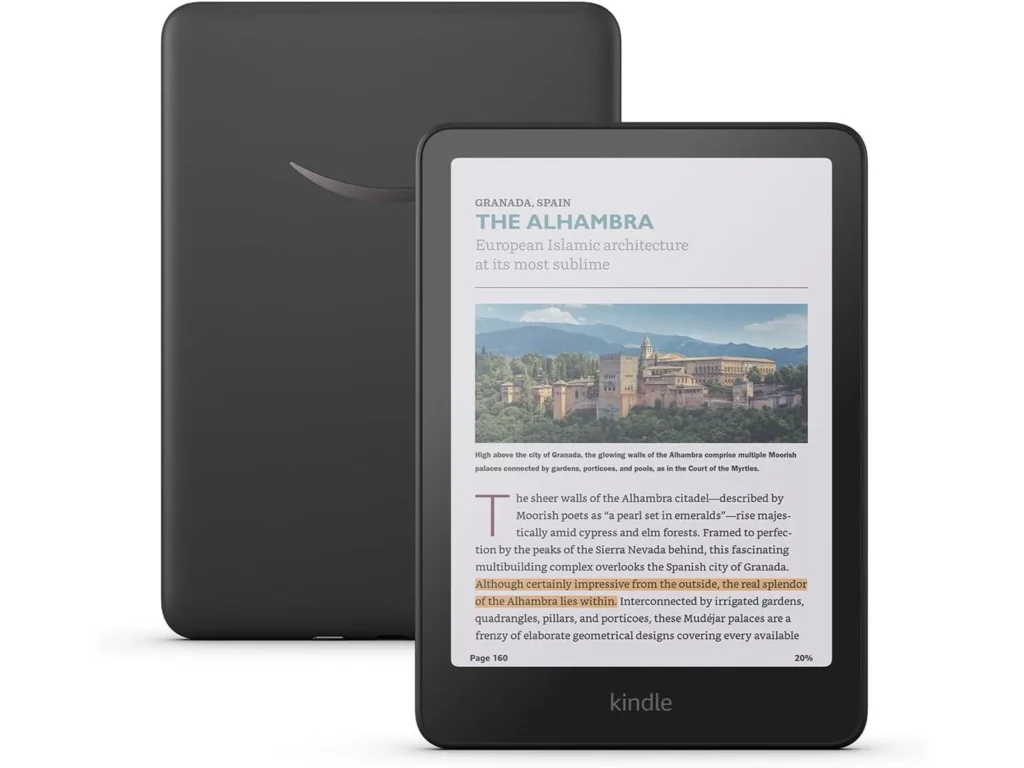
Amazon describes the screen as its 7-inch Colorsoft display with a built-in light, 300 ppi in black and white, 150 ppi in colour and 16 levels of grey. The same product page adds a caveat that belongs in any buying decision: "Due to the addition of a color filter layer that creates the easy on the eyes color reading experience, you may notice that the texture or brightness of the Kindle Colorsoft display looks different than the Kindle Paperwhite display."

That layer is how colour E Ink works. A grid of colour filters sits over a black-and-white panel, so colour images resolve at half the linear resolution of text. Amazon does not name the panel on its page. Good e-Reader identifies it as E Ink Kaleido 3 at 1264 by 1680 pixels and lists Amazon's own additions to the stack: a coating between the display layers to strengthen colour, a light guide meant to cut stray light, and an oxide backplane for contrast.

For reading, that means covers, maps, charts, comic panels and highlights gain colour, and the colour is muted, closer to newsprint than to a phone. Novel text keeps the Paperwhite's sharpness but sits behind the extra filter. Good e-Reader, having reviewed this model, concludes that the 12th-generation Paperwhite and the Paperwhite Signature Edition do a better job with plain books. Tom's Guide, reviewing the same model against the Kobo Clara Colour, found the Kindle slightly quicker to show a page and equally readable in direct sun.

The first Colorsoft, the 2024 Signature Edition, shipped with a yellow tint along the bottom of some screens. Amazon told Engadget that "a small number of customers have reported a yellow band along the bottom of the display" and offered replacements or refunds. Good e-Reader reports that firmware updates did not cure it and that Amazon changed the screen assembly and motherboard instead, with this 16 GB model the first new reader built with those changes. None of the sources read for this review reports the band on this model.

Front light, warmth and a dark mode that came late

7.5/10Good
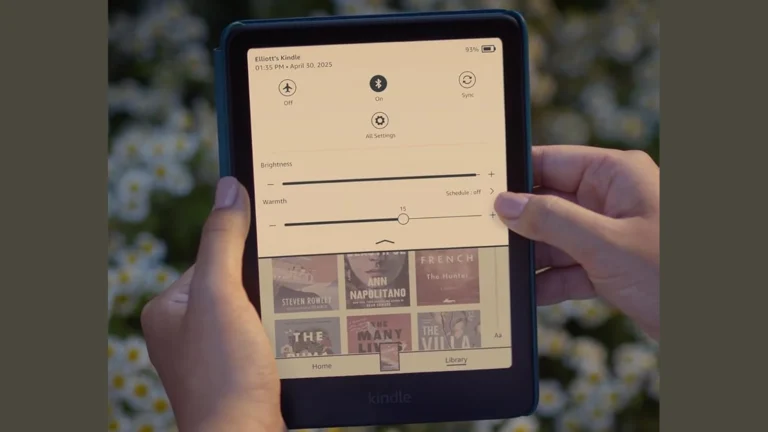
Kindle Colorsoft in a teal cover held in two hands, showing the quick settings panel with the Brightness slider and the Warmth slider set to 15
Authentic crop of an Amazon listing image showing the Kindle's own brightness and warmth controls. The device sits in one of Amazon's covers. Product illustration based on manufacturer imagery (Amazon listing image)

The light is the Colorsoft's least controversial part. Amazon says the screen adjusts from white to amber for reading in sun or in the dark. Good e-Reader counts 25 LEDs, 12 white and 13 amber, mixed with a warmth slider, and calls it the best lighting system among e-readers. What this model does not have is the ambient light sensor. Amazon reserves the auto-adjusting front light for the Signature Edition, so here you set brightness by hand, or put warmth on a schedule.

Dark mode has a messier history. Until spring 2026 the Colorsoft only had Page Color, which turns the page black and the text white inside books but leaves menus and the library white. The eBook Reader reported on 4 May 2026 that system-wide dark mode had started to appear on Colorsoft models after software 5.19.3.0.1, switched on by Amazon rather than by the update itself, so an up-to-date reader may still wait for it. It offers full dark mode, or a dark page with light menus, or the reverse.

Amazon's product page now contradicts itself on this. A bullet advertises Dark Mode, while the FAQ further down still says it "is currently not available on this device". The newer reporting and the bullet agree, so this review treats the FAQ as out of date.

The Paperwhite's body, at 215 grams

8.0/10Excellent
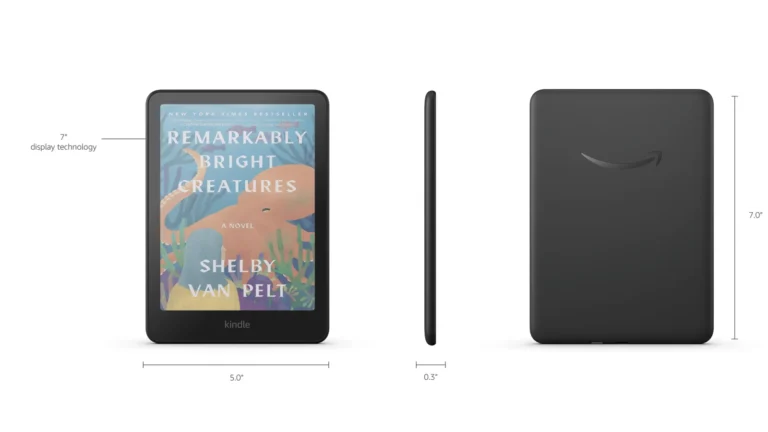
Amazon's dimension diagram of the Kindle Colorsoft: front view marked 5.0 inches wide with a 7-inch display, side profile marked 0.3 inches, and rear view marked 7.0 inches tall
Amazon's own dimension diagram for the Kindle Colorsoft 16 GB, cropped. The measurement labels are Amazon's. Product illustration based on manufacturer imagery (Amazon listing image)

Amazon gives the size as 127.6 by 176.7 by 7.8 mm and the weight as 215 g. Good e-Reader says the 16 GB Colorsoft uses the same body as the 12th-generation Paperwhite, so cases made for that Paperwhite fit, and Amazon sells its covers as fitting both. The glass front is flush with the bezel.

At that weight it is light enough for one-handed reading in bed. It is also slightly lighter than the Signature Edition, which Good e-Reader attributes to the missing wireless charging coil in the back plate. The same review notes that the plain black back of this model picks up fingerprints more readily than the Signature Edition's metallic finish. Black is the only colour.

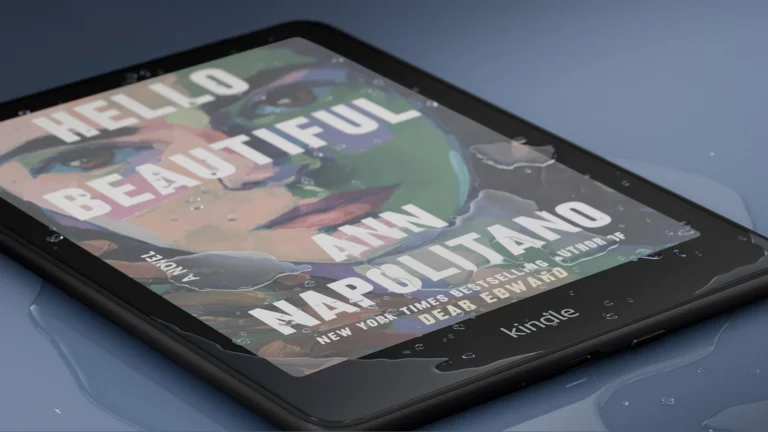
The water rating is IPX8, which Amazon defines as surviving 2 metres of fresh water for 60 minutes. Good e-Reader adds a seawater figure of 0.25 metres for three minutes and advises rinsing the reader under tap water after the pool or the sea.

Eight weeks of battery, no charger in the box and 16 GB

6.5/10Fair
Kindle Colorsoft lying on a wet blue surface with water droplets on the screen, showing a colour book cover and the bottom edge of the black frame
Authentic crop of an Amazon listing image for the Kindle Colorsoft 16 GB, used by Amazon to illustrate the IPX8 water rating. Product illustration based on manufacturer imagery (Amazon listing image)

Amazon rates the battery at up to eight weeks, "based on a half hour of reading per day with wireless off and the light setting at 13". That works out to about 28 hours of reading per charge (8 weeks by 7 days by half an hour). The Paperwhite and Paperwhite Signature Edition are rated at up to 12 weeks under the same wording, about 42 hours, and Amazon points readers who want longer runtime to those models itself. The FAQ says the Standard and Vivid colour styles make no difference to battery life. Streaming Audible over Bluetooth shortens it. Good e-Reader puts the cell at 2310 mAh, the same as the Signature Edition's.

If you read an hour a night, Amazon's own test conditions point to a charge roughly every four weeks, and more often with the light turned up or Wi-Fi left on.

Charging is by USB-C only, in under 2.5 hours from a 9 W adapter according to Amazon. The box holds the reader, a USB-C cable and a quick start guide, so the adapter is yours to supply. Wireless charging is a Signature Edition feature.

Storage is 16 GB, which Amazon says holds thousands of books, and Amazon content also sits in free cloud storage. There is no card slot. Good e-Reader warns that the storage fills up once audiobooks are involved, and large comic volumes take far more room than novels.

The Kindle Store, and files from anywhere else

7.0/10Good
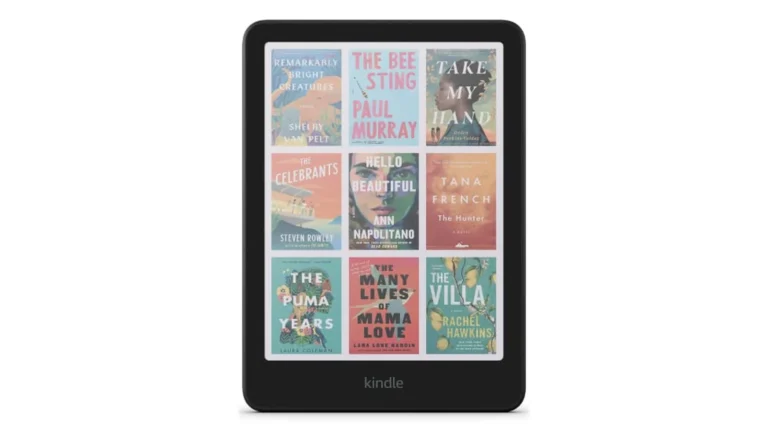
Kindle Colorsoft front view with the library showing nine colour book covers in a three by three grid
Amazon's own render of the Kindle Colorsoft library view, upscaled from the product page image. Covers are Amazon's demonstration content. Product illustration based on manufacturer imagery (Amazon listing image)

The software is where most buyers decide between Amazon and Kobo. Amazon quotes over 15 million titles in the Kindle Store worldwide, with Kindle Unlimited as an optional subscription. Colour adds four highlight colours, yellow, orange, blue and pink, which you can filter later, and cover art in the library and store. Good e-Reader notes the June 2025 update that added paragraph, word and character spacing controls, which apply to sideloaded books too.

Files from outside Amazon are the weak spot. The technical details list AZW3, AZW, TXT, PDF, unprotected MOBI and PRC as native formats, while EPUB, DOCX and several image formats arrive only "through conversion" by Amazon's Send to Kindle service. If your library is EPUBs bought from other stores, check how those files are protected before assuming they will move across. Good e-Reader also found in 2025 that PDFs copied over by cable displayed in black and white, and that only PDFs sent through Send to Kindle showed colour. This review could not establish whether a later update changed that.

The interface is less adjustable than Kobo's. Tom's Guide could not remap the tap zones for turning pages and opening the menu, which a Kobo allows, and there are no physical page-turn buttons. Our comparison of the Kobo Clara BW and Clara Colour covers the Kobo side of that choice, including its colour model.

Alternatives worth considering

Kobo Libra Colour

For readers who want colour plus physical page-turn buttons, native EPUB and library borrowing through OverDrive, giving up the Kindle Store and Amazon's comics catalogue.

Kobo Clara Colour

A smaller 6-inch colour reader that Tom's Guide found equally readable in sun, for buyers who prefer Kobo's store and customisable layout over a larger screen.

Where to buy

In-stock offers for this exact model, sorted by item price in USD. Shipping is not included unless a retailer supplies it. Not every retailer is listed. Prices last checked 11 hours ago.

Retailer prices for the Amazon Kindle Colorsoft 16 GB (1st generation, 2025 release), Black, no ads
RetailerItem priceShippingAvailabilityCheckedLink
Amazon.com$289.99See retailerListedCheck price at Amazon.com

Prices and availability come from retailer feeds and change without notice; the retailer’s page is authoritative. We may earn a commission if you buy through these links.

Final verdict

Amazon Kindle Colorsoft 16 GB (1st generation, 2025 release), Black, no ads
7.1/10Editorial ratingGood

Score breakdown

Scores run from 1.0 to 10.0: 9+ exceptional, 8–8.9 excellent, 7–7.9 good, 6–6.9 fair, 5–5.9 mediocre, below 5 poor. The overall score is the weighted average of the rated sections; unrated sections do not count.

Pros

  • Colour covers, comics, maps and four highlight colours on a front-lit E Ink screen that stays readable in direct sun
  • Text as sharp as the Paperwhite's
  • 215 g and 7.8 mm, in the Paperwhite 12th generation's body, so its cases fit
  • IPX8, rated for 2 metres of fresh water for 60 minutes
  • Warm light with 13 amber LEDs according to Good e-Reader, adjustable by slider or schedule
  • System-wide dark mode has been rolling out since spring 2026
  • Sold without lock-screen ads

Cons

  • Amazon rates the battery at two thirds of the Paperwhite's, under the same test conditions
  • Amazon warns that the colour filter makes the page look different from a Paperwhite's
  • No ambient light sensor and no wireless charging, both kept for the Signature Edition
  • No power adapter in the box
  • EPUB files only arrive through Amazon's conversion service
  • Good e-Reader found sideloaded PDFs displayed in black and white in 2025
  • Tap zones for page turns cannot be remapped, and there are no page-turn buttons
  • 16 GB fills quickly with audiobooks or large comic volumes

Conclusion

It is a Paperwhite-sized reader with a colour filter over the page, and nearly every judgement follows from that filter. Colour covers, comics, charts and highlights are the gain. A page that Amazon itself says looks different from a Paperwhite's, and a battery rating a third shorter than the Paperwhite's, are the cost.

For anyone who already buys comics, manga or illustrated books from Amazon, this is the Kindle to get, and the Signature Edition is only worth the step up for wireless charging, the light sensor or the extra storage. Novel readers should buy the Paperwhite. Anyone who keeps EPUBs from other stores or wants page-turn buttons should look at the Kobo Libra Colour instead.

Two things would change this advice. A confirmed fix for colour in sideloaded PDFs would lift the software score for anyone who reads documents. Dark mode reaching every Colorsoft, and Amazon correcting its FAQ, would settle the lighting question.

Andreea-Viviana Jitaru’s take

The most useful fact about this Kindle is on Amazon's own product page. Amazon tells buyers that the colour filter changes the texture and brightness of the page, and it points anyone who wants longer battery life to the Paperwhite. That suggests Amazon sees the Colorsoft as the reader for picture-heavy books rather than a replacement for the Paperwhite, and that is how we would buy it too. The value of the 16 GB model sits in how little it gives up against the Signature Edition: a light sensor, a charging coil and storage most book readers will not fill. The weak spots are software rather than hardware, namely EPUB by conversion, the PDF colour report and fixed tap zones, and a Kobo buyer has none of those.

Buy it if
  • Comics, manga and graphic novels from Amazon
  • Cookbook, travel guide and illustrated non-fiction readers who want colour without a backlit tablet
  • Kindle Store regulars who want colour highlights
  • Parents buying for picture-heavy children's books
Consider an alternative if
  • You read mostly novels and want the crispest text and the longest battery rating
  • Your library is EPUB files from other stores
  • Physical page-turn buttons or customisable tap zones matter to you
  • Auto-brightness or pad charging is a must

Questions readers ask

What is the difference between the Kindle Colorsoft and the Colorsoft Signature Edition?

Amazon says the Signature Edition adds an auto-adjusting front light, wireless charging and 32 GB of storage. The 16 GB Colorsoft has the same 7-inch colour screen, adjustable warm light and IPX8 rating.

Is the Kindle Colorsoft as sharp as a Paperwhite for text?

Both are 300 ppi for black-and-white text. Amazon notes that the Colorsoft's colour filter layer can make the page's texture or brightness look different from the Paperwhite's, and Good e-Reader judges the Paperwhite better for plain books.

Does the Kindle Colorsoft have dark mode?

Yes, since a staged rollout that began around late April 2026 after software 5.19.3.0.1, according to The eBook Reader. Amazon switches it on per device, so it may not appear straight after updating. Amazon's product FAQ still says it is unavailable, which appears to be out of date.

How long does the battery last?

Amazon rates it at up to 8 weeks with half an hour of reading a day, wireless off and the light at 13, which is about 28 hours of reading. The Paperwhite is rated at up to 12 weeks under the same conditions.

Does it come with a charger?

No. The box contains the Kindle, a USB-C cable and a quick start guide. Amazon quotes a full charge in under 2.5 hours with a 9 W USB adapter.

Can it read EPUB files?

Only through conversion. Amazon lists EPUB among the formats supported through its Send to Kindle conversion rather than natively.

Did the yellow band problem affect this model?

The yellow band was reported on the 2024 Colorsoft Signature Edition. Good e-Reader reports that Amazon fixed it with screen assembly and motherboard changes and that the 16 GB model was the first new reader built with them.

About the reviewer

Editor

Andreea edits the written side of the site: the editor's note on each product page, the category buying guides and the blog. Her brief is to say what a specification table cannot — where a product is genuinely good, where it quietly compromises, and who should walk past it. A note that reads like marketing copy, or that praises a product without naming a drawback, does not go live.

This is a research-based assessment: the reviewer compiled it from published specifications, documentation and independent measurements rather than from testing the unit.

Profile and other work →

Sources

  • Amazon, Kindle Colorsoft 16 GB product page with technical details (read 22 September 2026)amazon.com
  • Amazon, Amazon expands Kindle Colorsoft family with 16 GB model (July 2025, updated 1 September 2026)aboutamazon.com
  • Good e-Reader, Amazon Kindle Colorsoft 16GB Full Reviewgoodereader.com
  • Tom's Guide, Kindle Colorsoft reviewtomsguide.com
  • The eBook Reader, Kindle Colorsoft Now Supports System Wide Dark Mode (4 May 2026)blog.the-ebook-reader.com
  • Engadget, Amazon will fix the Kindle Colorsoft's yellow display discoloration (2024)engadget.com
  • Amazon Best Sellers, eBook Readers (retrieved 22 September 2026, 06:20 UTC)amazon.com

← Back to the blog