Owners of a Kobo Libra Colour, Clara BW or Clara Colour who installed the Kobo 6.0 beta, or the 5.18 build before it, have been opening their e-readers to find highlights, notes, sideloaded books, My Words entries and reading stats missing. On September 25, 2026 Kobo published a help article saying nothing has been deleted and that a coming update will restore everything automatically. The same article carries a warning that matters more than the reassurance. Rolling back or reinstalling an older version of the software permanently deletes the missing content, and Kobo says it cannot be restored after that. If your Kobo shows either affected version, the safe move is to install Kobo OS 6.0.2 (software version 6.0.276679), which Kobo says brings back reading stats, My Words and sideloaded books but not yet the highlights and notes lost on sideloaded books, and to leave Revert alone.
Which Kobos and which versions
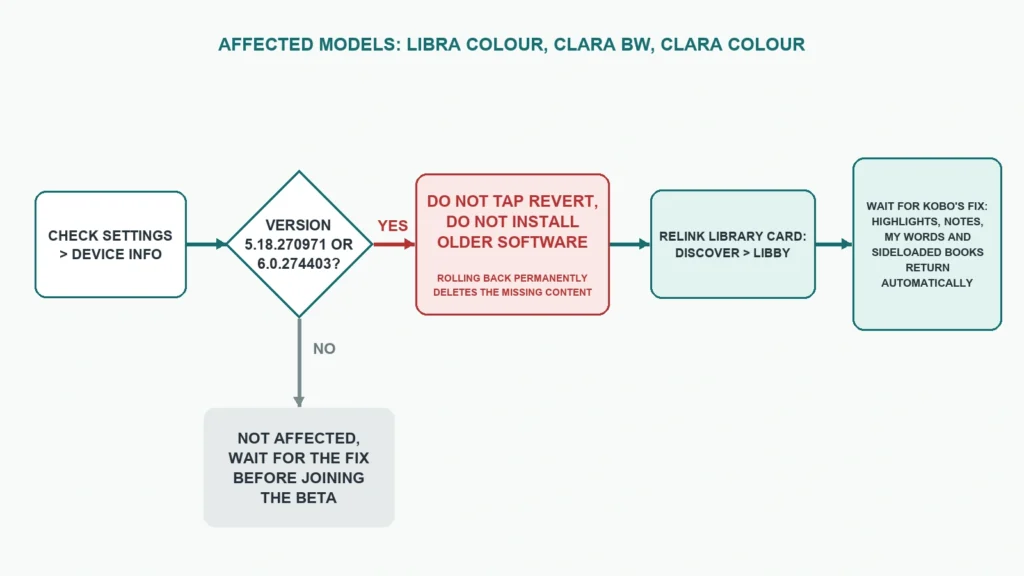
Kobo names three models: the Kobo Libra Colour, the Kobo Clara BW and the Kobo Clara Colour. The affected versions are 5.18.270971 and 6.0.274403, and Kobo calls both of them beta software. Anything earlier is not affected, according to the same help article, and your own version is listed under Settings, then Device Info.
The list leaves one model unexplained. The Elipsa 2E was among the four e-readers that could take the 5.x line when it started, yet it does not appear among the affected devices. Kobo has not said whether that means it escaped the bug or has not been assessed yet.
Owners on the regular 4.x software are outside this, and the Kobo Sage appears on neither list.
How ordinary owners ended up on a beta
The 5.x software did not start as a public test. Kobo released it on July 29, 2025 as an optional accessibility update for readers in the European Union, covering the Clara BW, Clara Colour, Libra Colour and Elipsa 2E. It brought larger interface text and other accessibility settings, and it cost a full reset to install. Kobo’s own page for it still lists what the 5.18 software lacks as of July 2026, including MOBI, RTF and HTML support, Asian language support, two-page landscape reading, supplemental fonts and pinch-to-zoom for font size.
Kobo now lists 6.0 next to 5.18 as beta software for the same models. Good e-Reader, which reported the problem on September 26, quotes a Kobo email addressed to people who “may have opted into the Kobo 6.0 Beta”. It also describes an in-device pop-up prompting owners to install the update, which would explain how readers who never meant to test anything ended up on it.
The Revert button is the trap
Kobo’s accessibility support page still explains how to go back: Settings, Device Information, then Revert under “Revert to previous version”. Its description of that step says the e-reader resets and loses the accessibility features. It says nothing about the missing annotations.
The newer help article overrides it. For anyone on 5.18.270971 or 6.0.274403, tapping Revert makes the loss permanent, and Kobo says rolling back also stops future updates from restoring the content. Since October 7 the article names two more actions that delete the missing content for good, a factory reset and signing out of your Kobo account.
What else 6.0 changes
The bug has buried the rest of the release, and some of it explains complaints that may not be bugs. The release notes for 6.0 say you have to link your library card again after updating, under Discover, then Libby. OverDrive is now called Libby on the device. An e-reader that suddenly shows no library loans may need only that step, although Good e-Reader also reports Libby borrowing failing outright. Kobo says 6.0.2 resolves some reported syncing issues for Libby and Kobo Plus books.
A new renderer now handles both EPUB and Kobo’s own KEPUB files, and Kobo warns it may slightly change page layout in books already on the device. Stylus markups may appear as a thumbnail with a note icon in the margin instead of on the page.
The useful additions are smaller: StoryGraph syncing, Wi-Fi setup by WPS, an optional clock while reading, and Bluetooth that no longer switches on Wi-Fi with it. Adobe DRM sign-in moves onto the e-reader, under More, Settings, Accounts, Adobe, using a ByteBooks account now that Adobe Digital Editions signs in through ByteBooks. The Clara Colour and Clara BW get a new renderer for DRM-free PDFs. Large Print Mode has moved to the Accessibility settings.
What to do now
- Check the version under Settings, then Device Info.
- On 5.18.270971 or 6.0.274403, do not tap Revert, do not install older software, do not factory reset and do not sign out of your Kobo account, even if a support page or forum post suggests it.
- Install Kobo OS 6.0.2 (software version 6.0.276679) when the prompt appears, or look for it under More, Settings, Device Information, Check for updates. It is still an optional beta, and Kobo is rolling it out in phases.
- Link your library card again under Discover, then Libby, if your loans have disappeared.
- If you read Adobe DRM books, sign in on the e-reader with a ByteBooks account.
- On earlier software, say no to any offer to join the beta until Kobo ships the fix.
Kobo OS 6.0.2 recovers reading stats, My Words entries and sideloaded books on its own, so you should not need to add those books again as long as you have not rolled back or reset the e-reader. It does not bring back highlights and notes lost on sideloaded books. Kobo says it is working on a fix for those in a future update and has not given a date. If anything else is still missing after the update, Kobo asks owners to contact its support.