Kobo released firmware 4.46.23836 on August 25, 2026, and the release notes open with an unusual admission. The listed improvements already work on your device, whether or not you install the update. That single line has left a lot of owners unsure what to do.
What version 4.46 contains
The release notes list two items. First comes a fix for payment verification failures in the Kobo Store, which had been blocking some customers from buying books directly on the device. The second is StoryGraph, the reading-tracking service that Kobo connected to its accounts earlier in 2026.
Neither entry describes a change to the reading software. There is no new font rendering, no new annotation tool, no page-turn behaviour to relearn. For a firmware release, that is a short list.
Which Kobo models get it
Firmware 4.46 went out to three devices. The Kobo Libra Colour, the Kobo Clara BW and the Kobo Clara Colour are the only models named.
Older readers are not included, and Kobo has not said whether they will be. If you own a Forma, an Aura or an early Clara, sync the device and see what it offers, because the update will not appear otherwise.
Why the notes say you do not need it
The release notes begin by telling you the enhancements are already available without updating. That reads like a mistake, yet it describes the situation accurately.
Both changes live on Kobo’s servers rather than on the device. The store payment problem sat in the purchase flow that the reader talks to, so fixing the service fixed every device at once. StoryGraph works the same way. You link the two accounts on Kobo’s website, and the connection lives with your account.
Firmware 4.46 therefore carries only the notes. Kobo appears to be documenting the changes inside the device changelog, which is where many owners look, even though the code that delivers them never touched the reader.
StoryGraph on Kobo: what the integration does
Kobo announced the StoryGraph partnership in May 2026 and started rolling it out in June 2026. StoryGraph is a reading tracker and recommendation service, and it is widely used as an alternative to Goodreads.
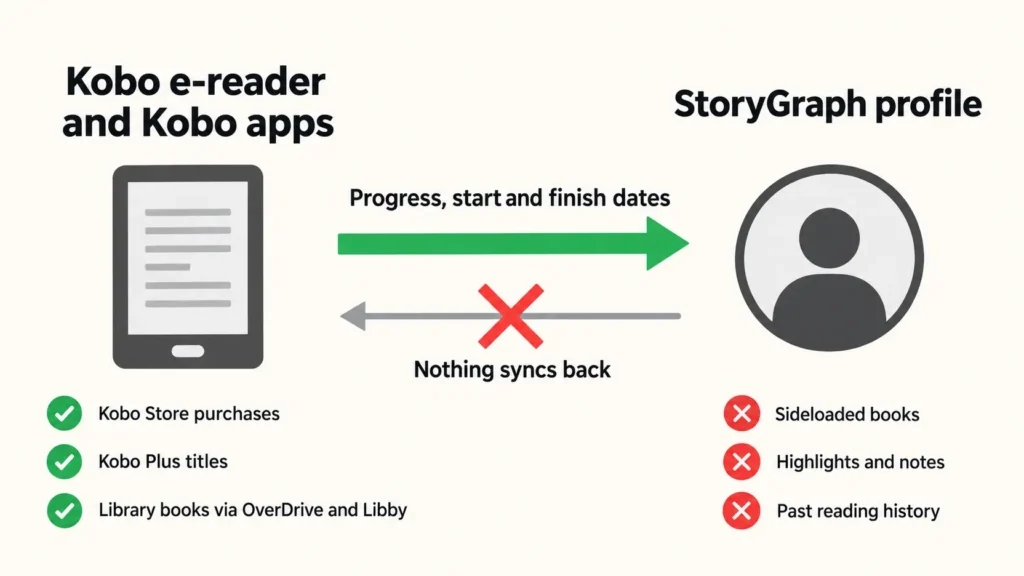
Once you connect the accounts, your Kobo reading turns into StoryGraph activity without any manual logging. Opening a book puts it on your Currently Reading shelf. Reading further moves the progress bar. Finishing a book marks it as read and records the date.
Kobo sends progress as a percentage, and StoryGraph converts that figure into pages or audio minutes using its own record for the edition. Small discrepancies between the two numbers are normal for that reason.
What syncs and what does not
The sync runs one way. Kobo sends data to StoryGraph, and nothing travels back, so shelving a book on StoryGraph will not change anything on your reader.
Three sources of books are supported. Titles bought from the Kobo Store, titles read through a Kobo Plus subscription and library books borrowed through OverDrive and Libby all sync.
Sideloaded books do not. If you copy an EPUB across by USB, or use Calibre to manage your own library, that reading stays invisible to StoryGraph. For readers whose shelves are mostly personal files, the integration will look broken when it is working as designed.
Highlights and notes stay on the device too. Kobo’s documentation is clear that annotations are not shared, and that disconnecting the accounts later will not remove data already sent.
Two more behaviours catch people out. Past reading history does not import, so your StoryGraph profile starts from the moment you connect. And Kobo documents that a book you mark as finished below 90 percent progress registers as did not finish, which means abandoning a long book near the end needs a manual correction on StoryGraph.
How to connect the accounts
You make the connection on the web. Sign in to your Kobo account, open the account settings, find the integrations section and connect StoryGraph from there. You then approve the link on the StoryGraph side.
The feature costs nothing, needs no subscription and is available to Kobo account holders generally. Because the link is account-level, it applies to the Kobo mobile apps as well as to the e-reader.
Should you install 4.46?
Kobo updates are optional, and this one carries no urgency. Nothing in the release notes fixes a bug you can feel on the device, and nothing unlocks a feature you cannot already use.
Two reasons still favour installing it. Staying current keeps you aligned with the version Kobo support will ask about, and firmware releases build on each other, so skipping several in a row makes a later jump larger. Against that, some owners deliberately hold back after a major release until reports settle, which remains a reasonable habit.
If your reader works well and you have no complaints, waiting costs you nothing here.
How to update, or how to skip it
The simple route is to connect your Kobo to Wi-Fi and sync. If the update applies to your model, the device offers it and installs it after a restart.
You can also sideload it. Kobo publishes firmware files for each model on its own firmware download page, and the file copies onto the device over USB. That path suits anyone whose reader is not being offered the update yet.
Skipping is equally simple. Decline the prompt and keep reading, because the store fix and the StoryGraph link reach your account either way.