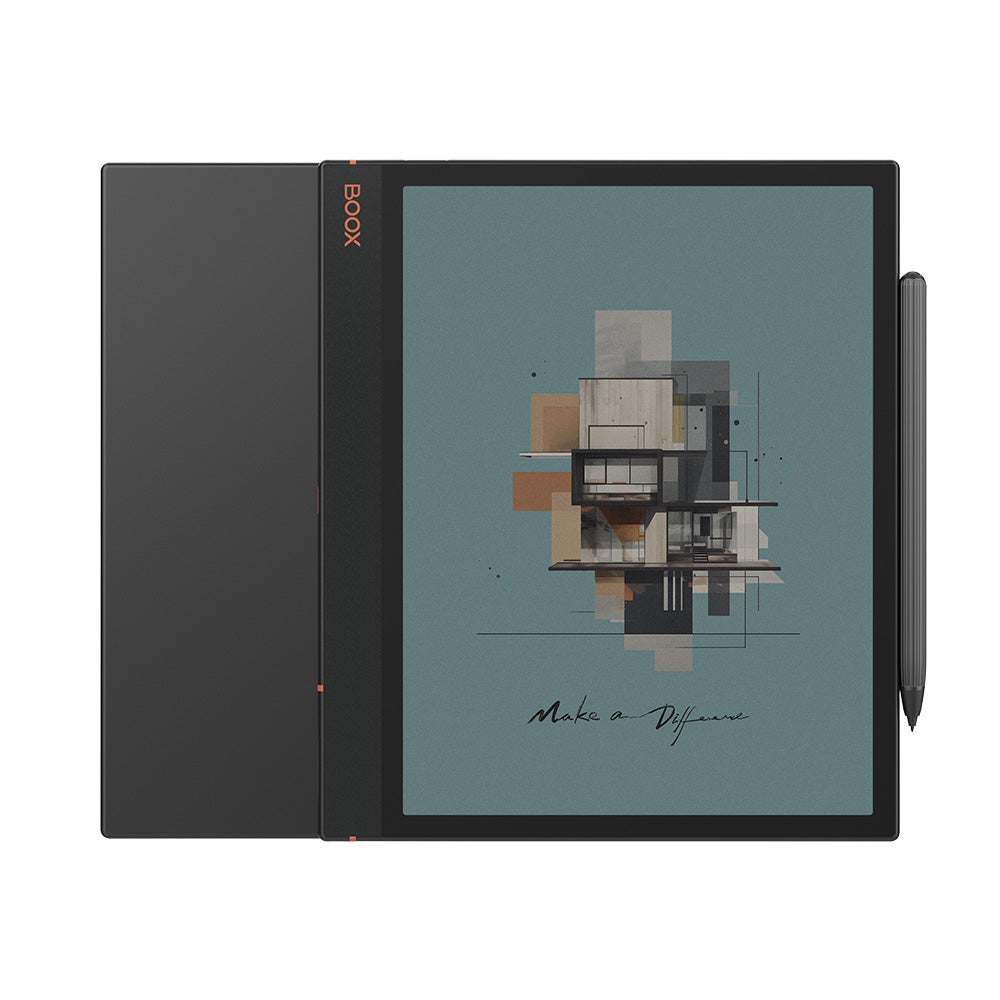
BOOX Note Air3 C: Specs, Features, Pros & Cons
The Note Air3 C is now two generations behind BOOX's current colour notebook, and that is the most useful fact to have before looking at anything else. BOOX still sells it alongside the Note Air5 C, so the real question is not whether this is a good E Ink tablet – it was one of the better ones of its year – but whether an older design at a lower price is the smarter buy.
What it offers is the familiar BOOX recipe at the standard notebook size: a Kaleido 3 colour layer over a Carta 1200 panel, a front light with adjustable warmth, a pen in the box, and full Android with the Google Play Store. Colour on Kaleido is muted and textured rather than vivid. It is excellent for highlighting, coloured annotations, charts and comics, and it will not make photographs look like a tablet screen. Black text stays sharp because the colour layer resolves more coarsely than the monochrome one beneath it.
Two practical details are easy to overlook: a microSD slot for a large document library, and a fingerprint reader built into the power button. Neither is glamorous, but both matter over years of daily use, and both are things several rival writing tablets leave out.
The limitation is age. It launched on an older Android release and an older processor, and it will reach the end of BOOX's firmware commitment sooner than its successors. For a student who wants colour note-taking and an open app store on a tight budget, that may be an acceptable price. For anyone buying a device to keep for five years, the newer model is the one to look at first.
Category strengths
Where the BOOX Note Air3 C beats the average
- Has color display ?
- A slightly lighter build ?430 g vs 435 g (avg)
How this VS Score was computed
Score 62: each known spec is measured against the median of E Ink note e ink tablets (10 products, medians winsorised to the 10th–90th percentile), then weighted. 53% of the scoreable weight could be used; unknown values, features not applicable to this class and proxies (battery capacity where a rated life exists) add or remove nothing.
| Specification | This product | Cohort median | Score weight | Points moved |
|---|---|---|---|---|
| Front light | Yes | 70% of the class have it | 1 | +50.0 |
| Color display | Yes | 50% of the class have it | 0.7 | +35.0 |
| Adjustable warm light | Yes | 70% of the class have it | 0.7 | +35.0 |
| Expandable storage (microSD) | Yes | 71% of the class have it | 0.5 | +25.0 |
| Weight | 430 | 435 | 1.5 | +1.5 |
| Screen size | 10.3 | 10.3 | 1.5 | +0.0 |
| Pixel density | 300 | 300 | 1.5 | +0.0 |
| Pen pressure levels | 4,096 | 4,096 | 0.7 | +0.0 |
| Android version | 12 | 12 | 0.5 | +0.0 |
| RAM | 4 | 4 | 1 | +0.0 |
| Internal storage | 64 | 64 | 0.7 | +0.0 |
| Battery capacity | 3,700 | 3,700 | 1.5 | +0.0 |
| Thickness | 5.8 | 5.8 | 0.7 | +0.0 |
Not scored: Resolution (one resolution dimension is not a sharpness measure; pixel density is scored instead); Fast refresh modes (standard for the class (100% have it)); Stylus included (standard for the class (90% have it)); Pen latency (unknown: not scored); Palm rejection (unknown: not scored); Handwriting recognition (unknown: not scored); Pen eraser (unknown: not scored); App store (standard for the class (100% have it)); Cloud sync (standard for the class (100% have it)); Subscription required (unknown: not scored); Screen mirroring (unknown: not scored); Split-screen (standard for the class (100% have it)); Battery life (weeks) (unknown: not scored); Charge time (unknown: not scored); USB-C (standard for the class (100% have it)); Bluetooth (standard for the class (100% have it)); 5 GHz Wi-Fi support (standard for the class (100% have it)); Keyboard support (standard for the class (100% have it)); Speakers (standard for the class (100% have it)); Microphone (standard for the class (100% have it)); Rear camera (unknown: not scored); Biometric unlock (standard for the class (100% have it)).
Editor’s note
The Air3 C is a sensible purchase in one situation: when it is meaningfully cheaper than the Air5 C and you would otherwise not buy a colour E Ink tablet at all. Hardware-wise it has aged less than you might expect. The 10.3-inch panel, the warm-and-cold front light, the 3,700 mAh battery and the bundled pen are the same broad package BOOX still sells, and for handwriting, PDF markup and reading, most of the day-to-day experience is unchanged.
Where the gap shows is underneath. It runs Android 12 on a 2.4 GHz octa-core chip with 4 GB of RAM and 64 GB of storage, against the newer model's more recent Android and larger memory. That matters less for BOOX's own apps than for third-party ones, where more memory keeps a browser, a reader and a notes app open together without reloading. The bigger issue for me is software lifespan. BOOX commits to firmware updates for more than three years from launch, and this model launched in 2023, so you are buying near the end of that window.
The colour layer deserves honest expectations. Kaleido 3 shows colour at 150 ppi against 300 ppi for black and white, and the palette is washed out by tablet standards. For highlights, diagrams and comics it is useful. For photos and video it is a curiosity.
I would pay for this only at a clear discount. If the price gap to the Air5 C is small, the newer device's longer update runway is worth more than the savings. And if you want a large writing tablet and never cared about colour, a monochrome model will give sharper text for less money.
Specifications
Quality bars are generated automatically against 9 other e ink tablets.
Display
Writing
Software
Performance
Battery
Connectivity
Design
Sources and verification
Where the specifications come from
- Official product pageshop.boox.com
Verification
- First published
- Specifications last checked
- Sheet completeness
- 30 of 41 specifications verified; the rest show as Unknown and are never estimated or scored
- Page type
- Product specification page — Compiled from the manufacturer’s published specifications and the cited sources; this is not a hands-on test.
- Basis
- Research-based: specifications and editorial text were compiled from the documents listed here and the manufacturer’s published data. We have not tested this unit ourselves; where independent measurements are mentioned they belong to the linked publication.
E Ink Tablets with similar specs to the BOOX Note Air3 C
Ratings & reviews
No reviews yet. Be the first to share your experience.
The bottom line
The BOOX Note Air3 C earns a VS Score of 62, comfortably above average among the 10 e ink tablets we compare here.
- Who it’s for
- A student or note-taker who wants colour highlighting and open Android on a budget, and can buy it at a real discount to BOOX's current model.
- Who should look elsewhere
- Anyone planning to keep a device for many years – it is late in BOOX's update window – or anyone who expects colour that looks like a tablet screen.
- The trade-off that matters
- You save money by buying an older platform, and the cost comes due in software: fewer years of firmware updates and less headroom for third-party apps.
- The main alternative
- BOOX Note Air5 C – the current generation of the same design, with a newer Android release, more memory and a longer update runway ahead of it.
The VS Score is calculated from the weighted specifications above, compared with every other e ink tablet we track — a shortlisting guide, not a substitute for your own priorities. See how we score.