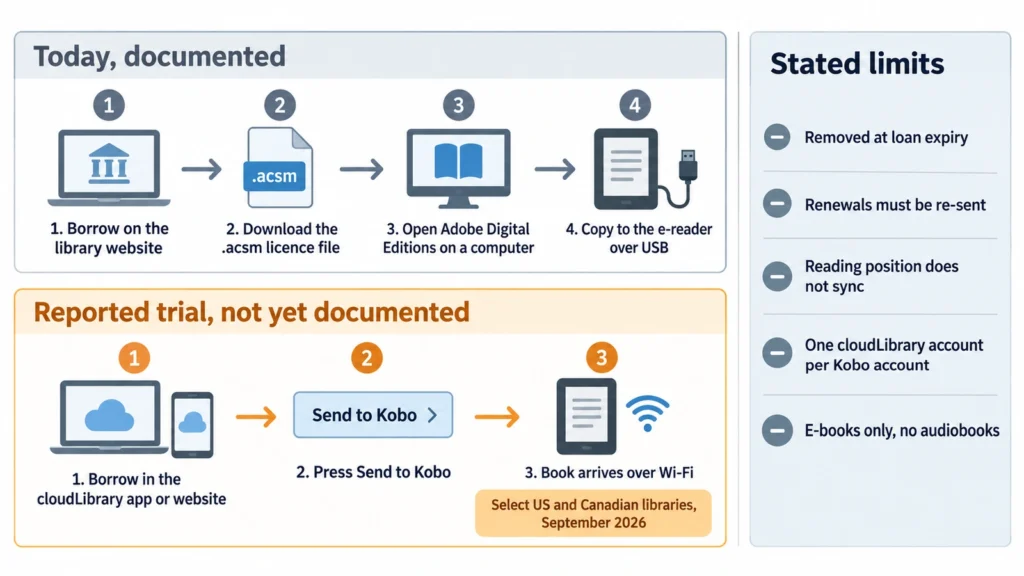
If your library moved off OverDrive, borrowing on a Kobo turned into a chore. You download a small licence file from the library site, open Adobe Digital Editions on a computer, plug the reader in by USB, and copy the book across. That is not a workaround someone invented. It is what Kobo’s own support pages still tell you to do. On 20 September 2026 came word that this may be about to change: Rakuten Kobo is reported to be trialling a cloudLibrary integration with a “Send to Kobo” button, with a wider rollout in October. The story is worth following closely, and it is also worth being precise about how much of it is confirmed.
What was reported, and when
The report, published on 20 September 2026, says Kobo and cloudLibrary are testing an integration with a small number of Canadian and United States libraries during September. A broader rollout to three devices is said to follow in October: the Kobo Clara Colour, the Kobo Clara BW and the Kobo Libra Colour.
cloudLibrary is a platform public libraries use to run their digital lending, in the same way OverDrive runs lending behind Libby. Plenty of library systems use it. Until now, none of them could push a book straight to a Kobo.
Why this matters more than it sounds
Kobo’s headline library feature has always been OverDrive, built into the reader, with your card stored in the settings. It works well, and it is the reason a lot of people chose a Kobo over a Kindle in the first place.
The catch is that it only helps if your library uses OverDrive. When a library system switches vendors, a Kobo owner does not get a slightly different app. They get dropped back to the Adobe Digital Editions route, which means a desktop computer, a cable and a file with an .acsm extension. Kobo documents that path in one line: “Use Adobe Digital Editions to copy the .acsm file to your eReader.” It works. It also asks a reader in 2026 to own a laptop and understand digital rights management plumbing to read a library book.
A “Send to Kobo” button would collapse that into one tap. That is the whole significance of the story.
How it is described as working
According to the report, you open a title in the cloudLibrary app or on the cloudLibrary website, borrow it, and press Send to Kobo. The book then arrives on the reader over Wi-Fi.
One detail is easy to skip and shapes the whole experience. The Send to Kobo button is described as living only inside the cloudLibrary app and website. Anyone who normally browses their branch’s own online catalogue would still have to go to cloudLibrary to send anything across. That is a meaningfully different shape from the OverDrive integration, where you browse and borrow on the device itself.
The limits, as described
The trial reportedly comes with five conditions, and none of them is trivial.
Borrowed titles disappear from the Kobo when the loan expires. Renewing a book in the cloudLibrary app or website does not push it back to the reader, so you have to send it again. Your reading position does not sync between the cloudLibrary app and the Kobo, so reading in both places means tracking your page yourself. A cloudLibrary account can be connected to only one Kobo account. And the trial covers e-books only, with no audiobooks.
That last pair matters for anyone with more than one reader in the house or anyone who switches between phone and e-ink during the day. The position-sync gap is the sharpest of them, because Kobo spent this year rebuilding progress sync for its own titles. A library book that does not carry your place is a step back from what Kobo owners have learned to expect.
Kobo’s own documentation today
This is where the caution comes in. Kobo publishes a short help article about cloudLibrary, and as of 20 September 2026 it reads as a disclaimer rather than a feature announcement: “The CloudLibrary app is not created by Rakuten Kobo. Rakuten Kobo does not provide support on how to use CloudLibrary.”
That article links onward to a cloudLibrary support page about downloading books for offline reading, and that link currently fails to resolve. cloudLibrary’s own e-reader help page describes the Adobe Digital Editions process and does not mention Kobo at all.
So neither company has published documentation describing Send to Kobo, an October rollout, or the device list. What exists is credible trade reporting with specific operational detail, which is usually how a quiet beta surfaces, and nothing official standing behind it yet.
Which devices are named, and which are not
The three readers named are all current colour-capable or recent models. The Kobo Clara Colour sits at the small end of that group at six inches, the Clara BW is its monochrome twin, and the Libra Colour is the seven-inch model with page-turn buttons.
Nothing has been said about older hardware, about the Sage, or about the Elipsa line. Whether a feature like this needs new firmware that older readers will also receive is exactly the sort of thing a support page answers and reporting cannot.
How far the feature reaches
It is not a replacement for the OverDrive integration. If your library uses OverDrive, nothing here changes for you and Libby remains the better experience, because you can browse and borrow without leaving the device.
Nor is it, on the evidence so far, a full in-device cloudLibrary catalogue. The described flow starts on another screen. Whether Kobo eventually builds cloudLibrary browsing into the reader the way it did with OverDrive is an open question, and the report is explicit that it remains to be seen.
What to do now
Check which platform your library uses before you get excited. Your library’s website will say, and the answer decides whether any of this touches you.
Owners of one of the three named readers whose library is on cloudLibrary have nothing to do except wait until October and watch Kobo’s help centre for an article that does not currently exist. For a book this week, the Adobe Digital Editions route still works and is documented.
If you are shopping for a reader right now and your library runs cloudLibrary, do not buy on the strength of this. Buy on the reading experience, the size and the store, and treat a working cloudLibrary integration as a bonus that may arrive. Features announced through a trial have a habit of shipping late, shipping partially, or shipping in one country first. Once Kobo publishes a support article naming the devices and the conditions, the story becomes advice. Until then it is a lead worth tracking.