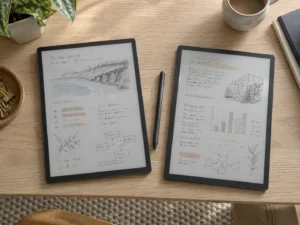
reMarkable released software version 3.28 in the first week of September 2026, and it is a larger release than the version number suggests. The headline addition is a Capture Tool that lets you circle part of a page and then move that content somewhere else. Alongside it sit a colour rendering fix, a reshuffled sharing menu and a genuine overhaul of the EPUB reading experience.
What version 3.28 adds
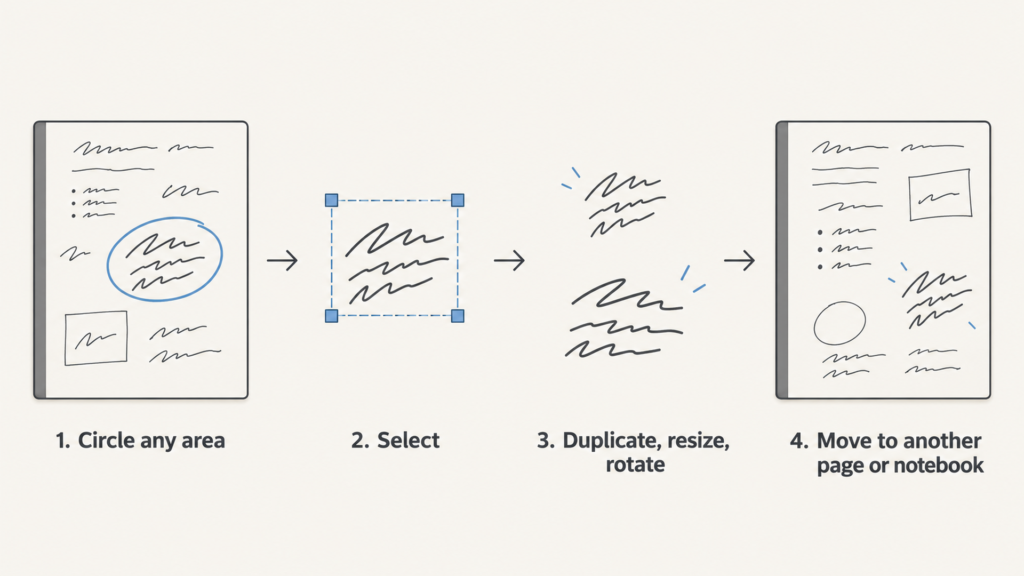
The Capture Tool lets you circle and select any area of a document. Once selected, that content can be duplicated, resized, rotated, or moved to a different page or a different notebook entirely.
Colour rendering improves for red tones on colour-capable devices, covering the ballpoint, fine-liner and calligraphy brushes. reMarkable says the change removes the screen-refresh flash that the old behaviour required.
The sharing menu moves onto the main toolbar, so exporting no longer starts with opening a three-dot menu.
Reading gets the broadest set of changes. The EPUB experience receives an interface update, better formatting, wider language support, clearer font and layout choices, and improved ebook thumbnails.
Why a Capture Tool is a bigger deal on paper tablets
Paper has one permanent limitation. Once you write something in the wrong place, it stays there. Digital paper has spent years imitating that constraint, and selection tools are the point where the imitation should stop.
Moving a diagram from the middle of Monday’s meeting notes into a project notebook is a normal thing to want. Doing it by hand means copying the drawing again. The Capture Tool turns that into a gesture, and the ability to rotate and resize matters because handwriting rarely lands at the scale you later need. People who sketch layouts, work through equations, or keep a running research notebook will feel this immediately.
The practical limit is worth stating plainly. This is a selection tool for content that already exists on a page. It reorganises your writing rather than interpreting it.
The red fix, and what a refresh flash costs you
Colour E Ink screens do not repaint the way an LCD does. To place certain tones accurately, the panel often has to clear the whole screen and redraw it, which produces the brief black flash that E Ink owners know well.
That flash is tolerable when you turn a page. It is far more disruptive while you are drawing, because your hand is already moving and the stroke you just made vanishes for a moment. Removing the flash for red tones in three brush types therefore reads as a writing improvement. Red is also the colour most people reach for when marking corrections, so the fix lands where it gets used.
This applies to colour-capable hardware only. Monochrome devices were never doing that work in the first place.
The EPUB changes are the quiet upgrade
Reading has long been the weaker half of the reMarkable experience. EPUB support existed, yet formatting control stayed thin next to what dedicated e-readers offer. Version 3.28 widens the font and layout options, improves how text is laid out, and extends language support.
That last item deserves attention if you read outside English. Expanded language support usually means better handling of scripts and accented characters that previously rendered poorly, and it is the sort of change that either fixes your library or does not touch it at all. Load a book you had trouble with before and check it directly.
Where a closed device sits against Android E Ink tablets
reMarkable ships a single, controlled piece of software. That is why an update like this one arrives as one coherent set of changes, and it is also why the reading experience improves only when reMarkable decides to improve it.
The alternative approach runs Android and lets you install whatever reading app you already use. A device such as the BOOX Note Air5 C, a 10.3-inch colour E Ink tablet built for note taking, takes that route. You gain third-party apps and lose the tight consistency. Neither model is better in the abstract. The open approach saves a lot of friction for anyone whose reading lives inside a store or a library app. For someone who mostly writes and wants the writing to feel identical every time, the closed approach earns its keep.
Should you install it
Yes, for most owners. The Capture Tool is additive, the sharing change removes a step, and nothing here asks you to relearn a workflow.
One caveat applies. reMarkable stages its rollouts, so the update may not appear on every device on the same day, and no device-by-device schedule has been published. Check the software update screen yourself. If you read EPUB files regularly, that is the part of reMarkable 3.28 worth testing first, because it is the change most likely to alter how a book you already own looks on the page.