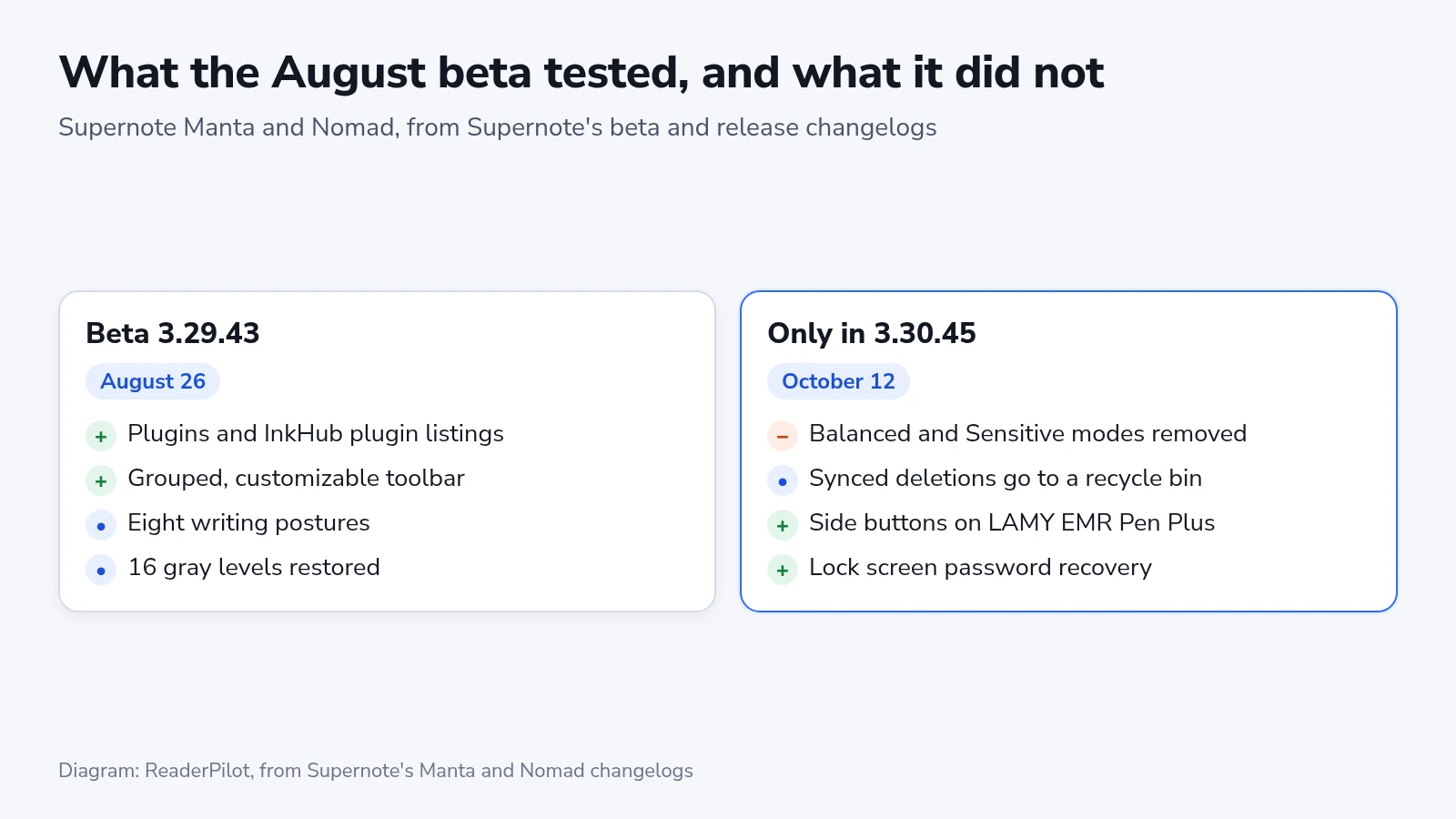
Supernote’s Chauvet 3.30.45 update removes the Balanced and Sensitive writing modes that Manta owners got only in June, so a pen you tuned then may feel different after updating. It also replaces left-hand and right-hand selection with eight writing postures. The headline addition is plugins, small community-written tools installed from the tablet’s InkHub store. Supernote began the rollout to the Manta and Nomad on October 12. Neither the mode removal nor a new recycle bin for synced deletions appears in the notes for the August 26 beta, the last build in Supernote’s published beta changelog.
Plugins in InkHub and on Reddit
InkHub, the resource store Supernote added in June for templates and stickers, now lists plugins as their own type. Supernote’s announcement describes the process as browse and tap to install. Early versions also appear on the r/Supernote_dev community on Reddit, where you install them by hand.
The first batch comes from community developers, and Supernote’s post credits each by name. A Dictionary plugin looks up a lassoed handwritten word offline. Ink2Task turns a handwritten checklist into tasks in a task app. Flashcards builds decks with FSRS scheduling, the spaced-repetition method used by Anki, and transfers them to Anki Desktop. Tables draws a ruled table into a note and keeps it editable, and Keyworder stamps your most-used keywords onto a page with one tap.
Until this update, Chauvet had no app store on the Manta or the Nomad. Anything the built-in tools and Supernote’s partner apps didn’t cover was out of reach on the tablet.
During the developer beta in May, eReadersForum reported that installing the plugin beta upgraded note files to a new format. The site added that notes opened in an older version of the phone app could show up as corrupted. The 3.30.45 changelog says nothing about the note format. Before you install a plugin, update the Supernote Partner app on your phone and computer. It costs nothing and keeps both sides on current versions.
Balanced and Sensitive modes, four months on
Chauvet 3.29.42, released June 15, let Manta owners switch the pen between a Balanced Mode and a Sensitive Mode. The option was under Settings, then Display & Input, then Stylus. The 3.30.45 notes say Supernote “optimized writing sensitivity and removed both” modes. No third setting takes their place, so whichever mode you picked in June, the pen now follows Supernote’s single tuning.
Left-hand and right-hand selection goes too, replaced by eight common writing postures, and the calligraphy pen is retuned to match them. Supernote adds that InkFlow needs its latest version to support the postures. On the Nomad, the update also reduces cases of ink appearing before certain EMR pens touch the screen.
Plugins, the new toolbar and the eight postures were already in the August 26 beta, so testers had nearly seven weeks with them. The removal of the two modes, the cloud recycle bin and support for LAMY’s new pens appear only in the October notes. Pick your posture again right after updating, before judging the new feel.
Pen buttons, recycle bins and storage cards
The Supernote × LAMY AL-star and safari vista EMR Pen Plus now get side button support. Without the update, what the button does depends on how far the tip is from the screen. Within 1 cm it triggers the function you mapped (eraser or lasso), and farther away it always erases. After updating, distance no longer matters, and a new setting lets compatible pens use the side button as a regular eraser.
Deleting a file on the tablet now moves its cloud copy to a recycle bin. That’s the Supernote Cloud Recycle Bin if you sync through Supernote Cloud, or Google Drive’s own recycle bin if you sync through Drive. You can switch the Supernote Cloud behavior off in your account settings on Supernote’s website. The tablet also no longer creates its default folders on a USB drive or microSD card.
Among the fixes, the display returns to 16 gray levels after showing only 15. PDFs now allow selecting right-to-left text such as Hebrew, and Bluetooth page turners can turn pages with their media buttons.
Installing it before the rollout reaches you
Supernote says over-the-air updates arrive in stages and usually reach every device within a few days. To install sooner, download the firmware from Supernote’s support site and connect the tablet by USB-C. Copy the zip file into the Export folder without unzipping it. Unplug, then tap OK on the tablet, or restart it if no prompt appears. A Mac needs an MTP tool such as OpenMTP or Android File Transfer to see the tablet. Safari also unzips downloads by default, so change that setting first.
The release notes and Supernote’s announcement leave three questions open:
- Whether the single sensitivity tuning is closer to the old Balanced or the old Sensitive mode.
- What checks a plugin passes before InkHub lists it, as opposed to the hand-installed Reddit releases.
- Whether the stable release changes the note file format, as the May developer beta did.