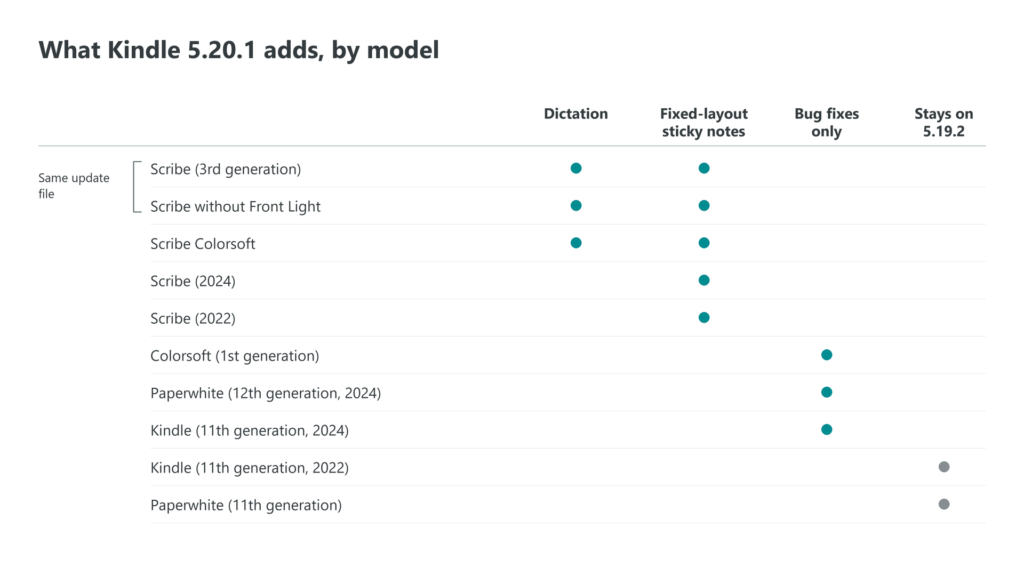
Kindle 5.20.1 gives voice dictation to three Kindles, and all of them are Scribes: the third-generation Scribe, the Scribe without front light and the Scribe Colorsoft. Amazon’s release notes, dated September 2026, give the 2022 and 2024 Scribes handwritten sticky notes in fixed-layout books and no microphone feature. The Paperwhite, the Colorsoft and the basic Kindle from 2024 get the same version number with one line about bug fixes. On those three readers, nothing in the update changes how you read.
Dictation stays on the current Scribes
Amazon describes the feature in a sentence: tap the microphone icon on the keyboard and speak, and the Scribe types the words. It works in three places, the Search box, annotations in books and documents, and the names of notebooks. The body of a notebook page is not on that list, so the pen is still how you fill one.
The notes for the 2022 and 2024 Scribes leave dictation out entirely. The eBook Reader blog, which reported the update on October 6, says those two models have no microphone, which would explain why a software update cannot add it.
The Scribe without front light is closer to the third-generation model than its name suggests. Amazon’s update page sends both to the same download file and the same release notes, so the two run one firmware.
Amazon does not say which languages dictation understands, or whether your speech is processed on the Scribe or on Amazon’s servers. If you keep a Scribe offline on purpose, try the microphone with Wi-Fi off before you count on it.
Sticky notes reach fixed-layout pages
Every Scribe gets the second feature, handwritten sticky notes in fixed-layout content. Fixed layout covers books whose pages cannot reflow, such as comics, picture books and many textbooks, and personal documents such as PDFs sent to the Kindle.
Amazon’s help pages already described sticky notes in regular Kindle books, and on certain imported PDFs you could write straight onto the page. Ink on the page sits over the text. A sticky note folds away behind a small icon, so a scanned worksheet or a magazine page stays readable, and one tap opens the note again.
You place one the same two ways as in other books, with the sticky note tool in the writing toolbar or by selecting text and picking it from the action menu.
The reading Kindles get a number and bug fixes
The Kindle Paperwhite from 2024, the Colorsoft and the 2024 basic Kindle move to 5.20.1 as well. Their notes say only “performance improvements, bug fixes, and other general enhancements,” the same words Amazon used for 5.19.6 in July. Kindles download and install updates on their own when they are on Wi-Fi, so most of these readers will change version without their owners noticing.
| Kindle | Version listed | What the notes add |
|---|---|---|
| Scribe (3rd generation) | 5.20.1 | Dictation, fixed-layout sticky notes |
| Scribe without Front Light | 5.20.1 | Dictation, fixed-layout sticky notes |
| Scribe Colorsoft | 5.20.1 | Dictation, fixed-layout sticky notes |
| Scribe (2024) | 5.20.1 | Fixed-layout sticky notes |
| Scribe (2022) | 5.20.1 | Fixed-layout sticky notes |
| Colorsoft (1st generation) | 5.20.1 | Bug fixes |
| Paperwhite (12th generation, 2024) | 5.20.1 | Bug fixes |
| Kindle (11th generation, 2024) | 5.20.1 | Bug fixes |
| Kindle (11th generation, 2022) | 5.19.2 | Not updated |
| Paperwhite (11th generation) | 5.19.2 | Not updated |
Two Kindles stay on 5.19.2
The 2022 basic Kindle and the 11th-generation Paperwhite are left out of 5.20.1. Amazon’s table lists 5.19.2 for both, a version from February 2026. The 2022 Kindle’s own notes go one step further, to 5.19.2.0.1 in April, a build the table does not show.
The Paperwhite’s notes have had nothing but maintenance since 5.18.6 in September 2025, which added a preview window for links inside a book. Dictation and the new sticky notes are Scribe features, so neither model is missing a feature it could have used.
Installing it by hand
A Scribe that has not updated yet can take the file from a computer. Amazon’s steps are to download the file for your exact model from its Kindle software updates page, connect the Kindle with its USB cable and drag the file onto the Kindle drive. Eject it, or on a Scribe use the Disconnect option on its screen, then open Settings, open the menu again and tap Update Your Kindle.
Pick the file by the model name. The third-generation Scribe and the Scribe without front light share one file, while the 2024 and 2022 Scribes each have their own. On a Mac, Amazon notes that copying files to a Scribe needs extra software, and after the update it suggests leaving the Kindle on its charger overnight so it can index your books again.
The eBook Reader blog also reports Kindles already running 5.20.1.0.1, a build Amazon’s page does not list and has published no notes for. The 2026 Kindle, Paperwhite and Colorsoft that Amazon announced on October 1 are not on the update page either, so the version they ship with is not yet public.