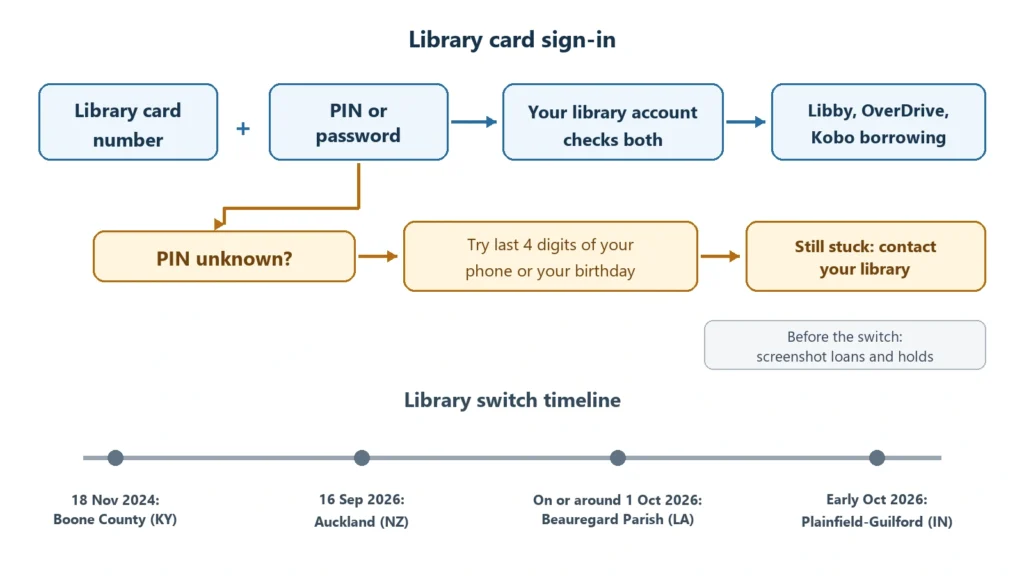
If your library has sent an email about a Libby PIN, it is one of a growing number moving their digital lending to sign-in with a card number plus a PIN or password. Auckland Libraries in New Zealand switched on 16 September 2026. Several US libraries have told patrons to expect the change on or around 1 October. The libraries describe it as an OverDrive requirement, OverDrive being the company behind Libby, and the practical task is the same everywhere: find your PIN before the switch, so that borrowing and holds keep working.
What the libraries have announced
The Plainfield-Guilford Township Public Library in Indiana posted its notice on 4 September 2026. It says patrons will need their library card number and PIN to use Libby, the OverDrive website and Kanopy, the library’s film service, and calls this “a new OverDrive requirement”. It asks patrons to “know their library PIN in addition to their library card number before October 1st”, while the change itself arrives in early October.
Beauregard Parish Library in Louisiana gives the same window, “on or around Oct 1”, and explains that OverDrive “is increasing security around log-in access”. It also tells patrons what their PIN is likely to be by default: the last four digits of the phone number on their library account.
Auckland Libraries went first among the notices we found. Its post of 15 September said that from Wednesday 16 September 2026, borrowers must sign in with their library barcode and PIN or password.
We could not find a company-wide announcement from OverDrive. The wording comes from the libraries, and the dates differ from one library to the next. It is also not the first time. Boone County Public Library in Kentucky moved Libby to PIN sign-in on 18 November 2024. So the accurate picture is a rolling change, library by library, with no single date for everyone on Libby.
The Auckland switch and the missing loans
The Auckland change is the only one that has happened among these notices, and it came with a problem. The library wrote that it was “aware of an issue affecting some customers where checkouts and holds from before Wednesday 16 September may not appear in Libby or OverDrive.” Affected borrowers were asked to fill in a form so the library could restore the missing items, and the library said it was working “with the vendor” on a fix.
The post gives no timeline for the items to reappear. It does not say whether the loans were lost or only hidden, or whether a hold keeps its place in the queue after it is restored. If your library switches on 1 October, it makes sense to note down your current loans and holds beforehand, with the position shown for each hold. A screenshot of the Libby shelf is enough.
Finding your PIN before the switch
The PIN belongs to your library account, not to Libby. Libby’s help page on forgotten details, updated on 3 September 2026, suggests checking the back of the card for the number, which may sit under the barcode. For the PIN, it suggests trying “the last 4 digits of your phone number or your birthday”, and contacting the library if neither works.
If you have only ever used the card at the desk, you may never have typed the PIN at all. One way to test it is to sign in to your library’s own catalogue website with the card number and the PIN you think is right. Libby checks the same library account, so a pair that works there should work in Libby too.
When the switch reaches your library, Libby may ask you to confirm the card. Libby’s help describes a prompt to verify the card “before you can borrow or place a hold”. You find it under Menu, in the “For Your Attention” section, as “Verify Card”, and it takes the card number and PIN.
Kobo owners
Kobo e-readers can borrow from OverDrive libraries without a phone, and this is where the PIN matters most for e-reader owners. On a model such as the Kobo Clara BW, which supports Libby borrowing on the device itself, you link the library in the reader’s settings with a QR code or a web address and a code, then enter your “library card number and PIN/password (if required)”, in the words of Kobo’s help page.
Kobo’s help also says that signing in with an email address and password “is no longer a option”, and that you need to switch to the card number and PIN. If you linked your library to your Kobo years ago with an email login, check the borrowing section of the settings on the reader before your library’s switch date.
Kobo has not said whether a reader that is already signed in will be asked to sign in again when a library changes its method. Neither Kobo nor the libraries have addressed it, so a prompt after 1 October should not come as a surprise.
Kindle owners
A Kindle has no library borrowing on the device. In the US, Libby delivers a loan to a Kindle through your Amazon account, and you choose Kindle delivery in the Libby app. The PIN change affects the Libby side of that, the sign-in that lets you borrow in the first place. None of the libraries’ notices mention Kindle delivery, and we have not found anything to suggest it changes.
What is still unconfirmed
Three things remain open. There is no list of which libraries are affected, and OverDrive has not published one. There is no single date, since the notices we found range from 16 September to “early October”. And the Auckland loss of loans and holds has no public explanation, so there is no way to know yet whether other libraries will see the same thing.
Your own library’s website or newsletter is the reliable source for your date. If it has not said anything, ask at the desk or by email whether a PIN change is planned for Libby, and confirm your PIN in the same conversation.