A small Chinese maker released a pocket Android e-reader on 15 September 2026, and the reaction among readers was immediate. A reading device with an app store sounds like the end of a familiar frustration, because it promises Kindle, Kobo, Libby and your own files on one screen. The reality is more mixed, and it turns on four specifications that marketing pages rarely lead with.
What was released, and on what date
On 15 September 2026 two specialist e-reader outlets reported the release of the XTEINK S4. It is the first reader from that maker to run Android. Earlier models used the company’s own firmware.
The hardware is modest. The S4 has a 4.3-inch E Ink screen with a touch layer and a front light. It charges over USB-C, which matters because the same maker moved several recent models to magnetic pogo pins instead. There is no microSD slot. Storage is 32 GB internal, shared with the operating system, and the device carries 2 GB of RAM. The Android version is 11, which reached the public in September 2020.
Where it is on sale
Reports on this point conflict, so here are both. One outlet says company representatives have stated there are no plans for an international release and that the device is intended for China only. Another describes it as available now and highlights an open Android build supporting popular reading apps.
Both are specialist sources that cover the maker closely. What the disagreement most likely reflects is the difference between a domestic launch and an export listing, which for small brands often follows weeks later and sometimes never. Neither source settles which reading is correct today. Anyone outside China should treat the device as an import purchase with import consequences, meaning no local warranty and slow support.
Why Android and E Ink pull against each other
The appeal is obvious. A closed reader ties you to one bookstore, and a library borrower with a Kobo, a Kindle account and a stack of side-loaded PDFs has a genuine reason to want something more open.
The difficulty is that Android was written for screens that redraw themselves dozens of times a second. E Ink screens do not work that way at all. They hold an image with no power, and they change it by moving charged pigment particles through a fluid. That physics gives you daylight readability and weeks of standby. It also makes every animation the operating system takes for granted into a problem the device has to work around.
The refresh problem in plain terms
An E Ink panel has two ways to update. A full refresh rewrites the whole screen, usually flashing it dark and then light, which clears leftover traces cleanly. A partial refresh changes only the region that moved, which is far quicker but leaves faint remnants of the previous image behind. Those remnants are ghosting.
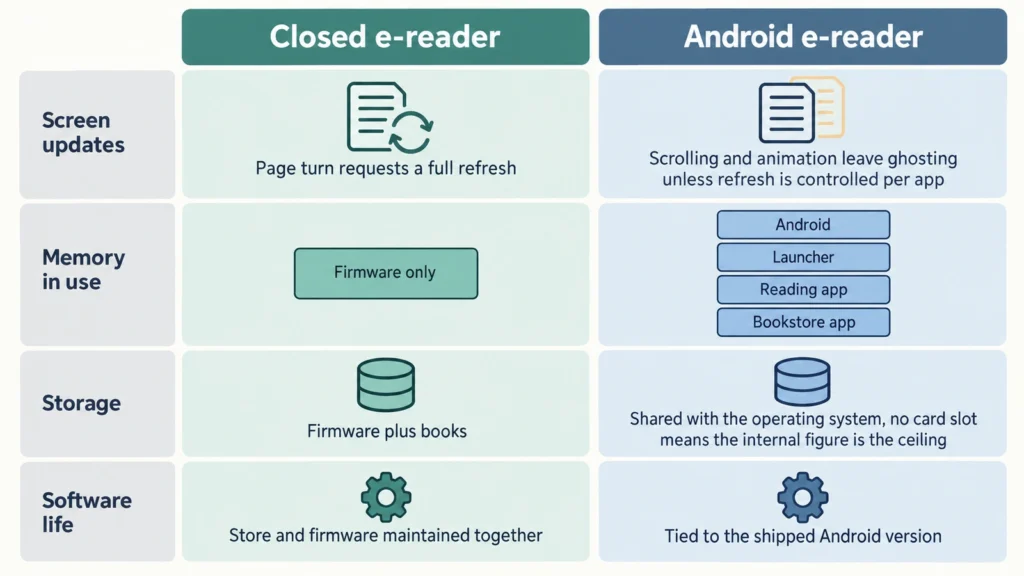
A purpose-built reading app knows this. It turns pages, so it can request a full refresh at sensible intervals and accept the flash. A general Android app does not know it. It scrolls, it fades, it slides panels in from the side, and on an E Ink panel each of those becomes a smear.
So the quality of any Android e-reader depends less on the app store than on the refresh-control layer the maker builds above it. The question to ask about any such device is whether you can set refresh behaviour per app, and how many modes there are. Makers who have been doing this for over a decade generally provide that. A first attempt frequently does not.
Why memory matters more here
On a closed reader, the firmware renders EPUB files and little else. Its working set is tiny, and 512 MB of RAM can be entirely adequate.
Android changes the arithmetic. The operating system itself sits in memory, the launcher sits in memory, and then your reading app, a bookstore app and a sync service sit on top. With 2 GB of RAM, switching between two reading apps often means the second one gets rebuilt from scratch when you return to it. On a screen that redraws slowly, that rebuild is something you watch happen.
Storage deserves the same scepticism. A figure like 32 GB is shared with Android and its cache, so the usable share is smaller than the label. On a device with no card slot, that number is also final.
The Android version is a shelf life
This is the specification buyers most often skip. An e-reader that ships on an old Android release inherits that release’s remaining app support.
Android 11 arrived in September 2020, so a device shipping on it in late 2026 starts six years behind. Reading apps rarely drop old versions quickly. Many will keep working for years. Even so, the direction only runs one way, and every year the pool of apps that still install shrinks a little. A closed reader ages differently, because its bookstore and its firmware are maintained together by one company.
What open Android buys you
The upside is real and worth stating fairly. You can run the reading app you already pay for, keep one library across devices, borrow from a public library through the app your library supports, and use a third-party reader for formats the built-in software refuses.
You also get text-to-speech, a browser for saving articles, and note-syncing services on larger models. None of that exists on a locked reader at any price.
The cost is assembly. Nothing is wired together for you, and you become the person who maintains it. That suits some readers very well and frustrates others completely.
How to judge one before you buy
Four checks cover most of the risk. Look for refresh-mode control that can be set app by app. Look for at least 4 GB of RAM if you intend to run more than one reading app. Check whether storage can be expanded, because on a device without a card slot the internal figure is the ceiling. Check the Android version and treat anything several releases old as a countdown.
It also helps to look at how an established maker packages the same idea. The BOOX Go 7 is a seven-inch reader built around exactly this trade-off, with a full Android build, an app store, a card slot and text-to-speech, and it shows what the mature version of the concept looks like and what it costs.
Who should skip an Android e-reader
If you read novels bought from one store and nothing else, an Android reader adds complexity you will never use. A closed device will be faster, cheaper and less demanding of your attention.
Anyone who juggles library loans, PDFs and two different bookstores will find the openness pays for itself. Buy it on the four specifications above rather than on the presence of an app store, because the store is the easy part and the refresh layer is the part that decides whether you enjoy using it.