On 11 September 2026, eBooks.com released rebuilt reading apps for iPhone, iPad and Android, and the interesting part is not the apps. It is the copy protection underneath them. The store is moving to Readium LCP, an open DRM standard that behaves very differently from the Adobe system most non-Kindle buyers have wrestled with for years. If you buy e-books outside Amazon, this shift decides which devices can open your purchases, whether you need yet another account, and whether a screen reader can read the book aloud.
What eBooks.com launched, and when
The new iOS and Android apps went live on 11 September 2026. eBooks.com built them with the European Digital Reading Lab, a non-profit based in Paris, and with Colibrio, a Swedish reading-engine company. The store says the apps handle fixed-format EPUB, audio-visual content, manga, and textbooks with complex layouts and specialised fonts.
The apps are one part of a larger platform change. eBooks.com had already introduced a browser-based Online Reader and added support for Thorium, the free desktop reading application, and describes all of it as a move to open, standards-based reading technologies including Readium LCP. Founder Stephen Cole said the apps integrate with the assistive technologies built into iOS and Android, including VoiceOver and TalkBack, and add controls over text size, typeface, spacing, alignment, colours and margins, with options intended for readers with dyslexia.
Readium LCP in one paragraph
Readium LCP is a DRM scheme published as an ISO standard, referenced as ISO/IEC 23078-2:2024. It protects EPUB, PDF and audiobook files. No single vendor controls it. EDRLab runs it, which means any retailer can become a licence provider and any developer can build a compliant reading app.
Two design choices separate it from what came before. Readers do not need to create a third-party account, so there is no separate DRM identity to register and no activation step tied to a vendor. And the licence server is operated by the retailer or library itself, so no outside company receives your reading data or the unencrypted file.
How a purchase reaches your device
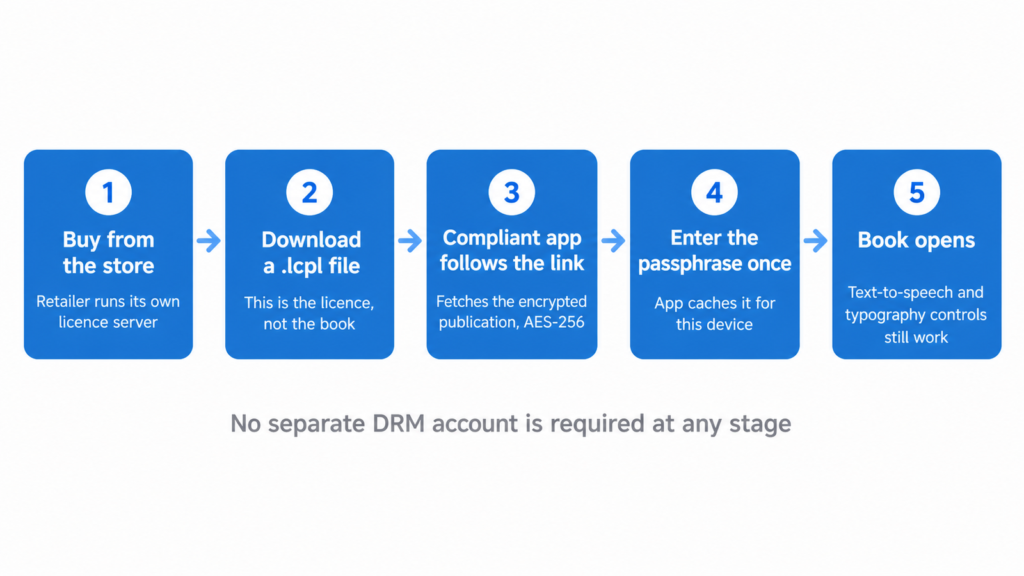
The mechanics are worth understanding, because the first download confuses almost everyone. What lands in your downloads folder is a small file ending in .lcpl. That file is the licence, not the book.
Open the .lcpl in a compliant app and the app follows a link inside it to fetch the encrypted publication, which is protected with AES-256. The app then asks for your passphrase once. After that it caches a hash of the passphrase and opens the book silently on that device from then on. You only meet the prompt again on a new device.
That single passphrase is also why LCP tolerates ordinary sharing. EDRLab states that readers can share their books with family or close friends, which is a deliberate contrast with schemes built to make any sharing impossible.
The accessibility argument behind the move
There is a regulatory reason stores are rethinking DRM, and it is not subtle. EDRLab points out that European accessibility rules that came into force in 2025 require distributors of digital publications to offer accessible services, and that a DRM which blocks screen readers from reaching the content stops being marketable in Europe.
LCP was designed for that requirement. A compliant app decrypts the content into a normal reading engine, so text-to-speech, reflow and typography controls keep working. For readers who rely on VoiceOver or TalkBack, that is the difference between owning a book and owning a file you cannot use.
Which devices can open an LCP book today
This is where expectations meet reality. EDRLab maintains a list of globally available reading systems that can handle LCP, and it is shorter than most buyers assume.
On desktop, Thorium Reader runs on Windows, macOS and Linux, is free, and handles EPUB, PDF, DAISY publications, audiobooks and Divina comics alongside OPDS catalogues. FBReader, a long-standing multi-platform app, also handles LCP-protected EPUB and PDF. On mobile, Aldiko Next is a free option built on the Readium toolkit that opens EPUB, PDF and audiobooks from any source.
E Ink hardware narrows the picture sharply. EDRLab names PocketBook and inkBOOK devices as able to sideload LCP-protected EPUB and PDF. Beyond those, your practical route on an E Ink screen is a device that runs Android and lets you install a reading app of your choice. The BOOX Go 7, for example, is a full Android device in a seven-inch reader’s body with an app store, which is exactly why people buy one instead of a closed reader. Nothing on it is wired to a bookstore, so whatever compliant app you install becomes your library.
Where Kobo and Kindle stand
Kindle owners can stop here. Amazon’s Send to Kindle tool accepts EPUB files that carry no DRM and converts them for you. An LCP-protected file is encrypted, so there is no path for it, and there is no third-party DRM support on Kindle hardware.
Kobo is more nuanced. Tolino e-readers, which Rakuten Kobo develops, have been LCP-compliant since 2019 and are the reading hardware behind Germany’s Onleihe library service, where EDRLab reports more than 25,000 LCP licences generated each day. Kobo’s own retail e-readers do not appear on EDRLab’s list of globally available LCP reading systems. Kobo has not said whether it intends to bring the same support to those devices, or on what timetable.
Why stores keep moving
LCP adoption is not a niche experiment. In France, every major e-book distributor now provides LCP-protected files, and the national library lending service has a stated plan to stop delivering Adobe-protected books during 2026. In the United States, the Internet Archive lends LCP-protected e-books and recommends Thorium on desktop, NetGalley uses LCP for publisher review copies, and the Palace Project has built it into its library apps.
The commercial logic is simple. EDRLab is a non-profit and charges no per-transaction fee, only an annual certification cost for licence providers. For a retailer weighing DRM costs against accessibility obligations, that arithmetic has been moving in one direction for several years.
What to check before buying a protected EPUB
Ask the store which protection it applies, because the answer changes what you can read the book on. Then check whether a compliant app exists for the device you already own and use. If your reading happens on an iPhone and a laptop, the apps already exist. If it happens on a closed E Ink reader tied to one bookstore, a protected file from a different store may never open there.
Keep the .lcpl file after the first download, and note that the passphrase belongs to the retailer or library account that issued the licence. The realistic failure mode is losing access to that account.
The honest limits
LCP is still DRM. The file is encrypted, the licence can carry a loan period, and a book you buy today depends on a licence server somebody else runs. What LCP changes is who holds that server, what it can see about you, and whether the resulting file works with assistive technology. Those are meaningful improvements, and they are not the same thing as owning an unprotected file.